1
Replacing the Lamp
Replace the lamp with a new one if a message displayed on the projected image (page 57).
Use an LMP-E220 projector lamp (not supplied) for replacement.
Caution
• The lamp remains hot after the projector is
turned off. If you touch the lamp, you may
burn your finger. When you replace the
lamp, wait for at least an hour after
turning off the projector for the lamp to
cool sufficiently.
• Do not allow any metallic or inflammable
objects into the lamp replacement slot after
removing the lamp, otherwise it may cause
electrical shock or fire. Do not put your
hands into the slot.
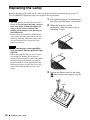
1
Turn off the projector, and disconnect
the AC power cord from a wall outlet.
2
When the lamp has cooled
sufficiently, open the lamp cover by
loosening 1 screw.
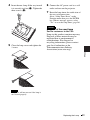
3
Loosen the three screws on the lamp
(1) then pull out the lamp by its grab
(2).
Notes
• If the lamp breaks, contact qualified
Sony personnel. Do not replace the lamp
yourself.
• When removing the lamp, be sure to pull it
out straight, by holding the designated
location. If you touch a part of the lamp other
than the designated location, you may be
burned or injured. If you pull out the lamp
while the projector is tilted, the pieces may
scatter if the lamp breaks any may cause
injury.
Grab
60
Replacing the Lamp