1
4
b
5
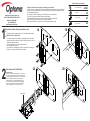
Fine Adjust Position
Gx2
c
4
c
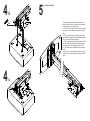
The following adjustments (labelled below) can be
made to fine tune position to correct any discrepancy
in the installation or mounted surface;
a To fine tune the length and tilt of the mount, loosen
bolts, slide mount to required position and re-tighten
bolts.
b To fine tune the level of the projector use the four
adjustment thumb wheels on the spring loaded cradle.
Do not fully unwind the thumb wheels.
c To fine tune height position of the projector, loosen
the boom assembly screws and slide the projector to
required position. Then re-tighten all four screws.
d The integrated level indicates that the mount arm
is at 0°.
This does not necessarily mean the projector is level
with the screen so other adjustments may need to be
made.
a
b
d
a