1
5.15 Connecting your phone to a computer
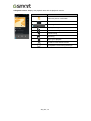
Tap and drag down Status Bar and tap “Connected as USB Storage” on your device. Please
choose one of modes to connect with your computer
5.16 Screenshots
Please press the and hold “Volume Down Key” and “Power Key” at the same time to capture
any screen from the device. Tap
> view screenshots. Please refer the screenshots
link :/Pictures/Screenshots
Android 4.4 | 23