1
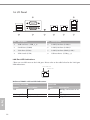
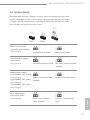
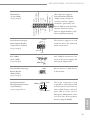
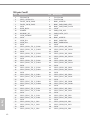
CPU Fan Connectors
(4-pin CPU_FAN1)
(see p.6 or p.9)
(4-pin CPU_FAN2)
(see p.6 or p.9, No. 7)
Front and Rear Fan
Connectors
(4-pin FRNT_FAN1)
(see p.6 or p.9, No. 6)
(4-pin FRNT_FAN2)
(see p.6 or p.9)
(4-pin REAR_FAN1)
(see p.6 or p.9, No. 3)
(4-pin REAR_FAN2)
(see p.6 or p.9)
+12V
CPU_FAN_SPEED
GND
FAN_SPEED_CONTROL
FAN_SPEED_CONTROL
FAN_SPEED
+12V
GND
1
2
3
4
English
32
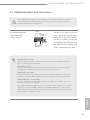
Please connect fan cables to the
fan connectors and match the
black wire to the ground pin.
All fans support Fan Control.
GND
+12V
FAN_SPEED
FAN_SPEED_CONTROL
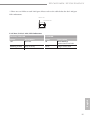
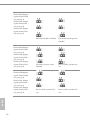
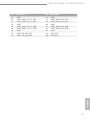
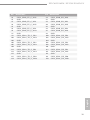
ATX Power Connector
(24-pin ATXPWR1)
(see p.6 or p.9, No. 2)
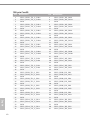
ATX 12V Power
Connectors
(8-pin ATX12V2)
(see p.6 or p.9)
(8-pin ATX12V3)
(see p.6 or p.9)
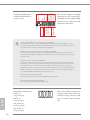
his motherboard provides
two 4-Pin CPU fan (Quiet
Fan) connectors. If you plan
to connect a 3-Pin CPU fan,
please connect it to Pin 1-3.
his motherboard provides a
24-pin ATX power connector.
To use a 20-pin ATX power
supply, please plug it along Pin
1 and Pin 13.
8
5
4
1
his motherboard provides
two 8-pin ATX 12V power
connectors.