1
Chapter 3 Advanced Adjustment/Setting
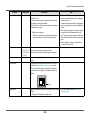
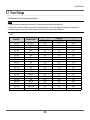
Input Signal
(The setting range of each function differs
depending on the input signal.)
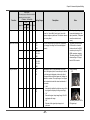
√: Settable -: Not settable
Function
Setting Range
HDMI
DisplayPort
PC Video
signal signal
DVI
D-Sub
Description
Analog
Auto
Adjustment Screen
Adjust
-
-
-
-
√
-
Screen flickering, display position, and size can be
adjusted automatically. Selecting “Auto Screen Adjust”
displays a message. Select “Yes” to enable this
function.
Auto
Range
Adjust
-
-
-
-
√
-
Every color gradation (0 to 255) can be displayed
by automatically adjusting the signal output level.
Selecting “Auto Range Adjust” displays a message.
Select “Yes” to enable this function.
- 28 -
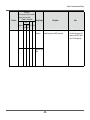
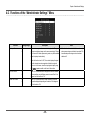
Note
• The automatic screen
adjustment function works
correctly when an image is
fully displayed over the entire
displayable area of the screen.
It does not work properly in the
following cases:
--When an image is only
displayed on part of the
screen (command prompt
window, for example)
--When a black background
(wallpaper, etc.) is used
Also, this function may not work
properly with some graphic
boards.
• When a signal is input into the
monitor for the first time or
when a resolution or vertical/
horizontal scan frequency not
used before is set, the self
adjustment function will activate
automatically (only for signals
with a resolution of 800×600
(SVGA) or higher).
-