1
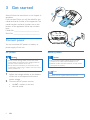
3 Get started
022 0 V
24
Always follow the instructions in this chapter in
sequence.
If you contact Philips, you will be asked for the
model and serial number of this apparatus. The
model number and serial number are on the
bottom of the apparatus. Write the numbers
here:
Model No. __________________________
Serial No. ___________________________
011 7 V
12
Connect power
You can use either AC power or battery as
power supply of this unit.
AC power
Warning
•• Risk of product damage! Make sure that the power
supply voltage corresponds to the voltage printed on
the back or the underside of the unit.
•• Risk of electric shock! When you disconnect the AC
power, always pull the plug or adaptor from the socket.
Never pull the cord.
1
2
6
Battery power
Caution
•• Risk of explosion! Keep batteries away from heat,
sunshine or fire. Never discard batteries in fire.
•• Batteries contain chemical substances, so they should
be disposed of properly.
Note
Adjust the voltage selector at the bottom
of the unit to correspond to the local
power voltage.
Connect the AC power cord to:
• the AC ~ socket on the unit.
• the wall outlet.
EN
•• Batteries are not supplied with the accessories.