1
EN
BINDING
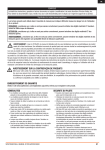
You must bind the receiver to the transmitter before it will operate. Binding is sharing identification codes between the receiver and
the active memory of the transmitter. Once bound, the receiver only connects to the transmitter when the previously bound model
memory is selected. You will need to rebind after the model is set in the transmitter to fully program the model’s failsafe positions. If
another model memory is selected, the receiver will not connect. This feature is called ModelMatch™ and prevents flying a model
using the wrong model memory.
1.
2.
3.
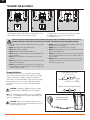
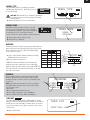
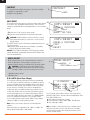
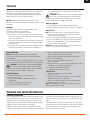
Binding using receiver and receiver battery
1.
2.
5.
4. HOLD SWITCH WHILE POWERING ON
4. HOLD SWITCH WHILE POWERING ON
3.
6.
5.
6.
Mode 2 Shown
Mode 2 Shown
1. Lower throttle to lowest position and make sure the
transmitter is powered off
2. Insert bind plug into BATT/BIND (BIND/DATA) receptacle.
3. Insert receiver battery into ANY open receptacle.
Note: The receiver’s LED flashes when the receiver is ready to
bind.
4. While holding Trainer/Bind switch, power on transmitter.
5. Keep hold on trainer switch until receiver’s LED stays
illuminated; this indicates the receiver is bound to the
transmitter.
6. Remove bind plug from receiver.
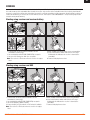
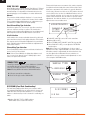
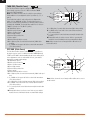
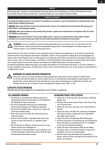
Binding using receiver and ESC
1.
1.
2.
4.
4.
2.
3.
3.
5. HOLD SWITCH WHILE POWERING ON
5. HOLD SWITCH WHILE POWERING ON
6.
6.
7.
7.
Mode 2 Shown
1. Lower throttle to lowest position and make sure the
Mode 2 Shown
transmitter is powered off
2. Insert bind plug into BATT/BIND (BIND/DATA) receptacle.
3. Insert ESC plug into THRO receptacle.
4. Connect battery to ESC and turn on ESC switch, if available.
Note: The receiver’s LED flashes when the receiver is ready to
bind.
SPEKTRUM DX6i • RADIO INSTRUCTION MANUAL
5. While holding Trainer/Bind switch, power on transmitter.
6. Keep hold on trainer switch until receiver’s LED stays
illuminated; this indicates the receiver is bound to the
transmitter.
7. Remove bind plug from receiver.
7