1
Using Lullabies
2
4
3
6
2
8
5
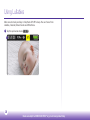
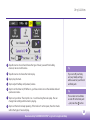
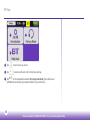
Tap either arrow to scroll and choose the type of music you want from lullaby,
classical, nature or white noise.
3
Tap either arrow to choose the track to play.
4
Tap to play the track.
5
Tap to adjust the Baby unit (camera) volume.
6
Tap to turn the timer on/off. When on, you’ll see a timer icon on the Lullabies tab and
quick access menu.
7
Tap to set your timer. Then tap the + or - to set how long the music plays. You can
change timer settings whilst a track is playing.
8
Tap to set the track to keep repeating. If the track isn’t set to repeat, the other tracks
within that type of music will play.
Need some help? Call 0808 100 6554* or go to bt.com/producthelp
Tip
If you turn off your Baby
unit, any lullaby settings
will be saved on your Parent
and Baby unit.
Tip
You can also turn Lullabies
on and off on the Baby unit
– just press the
button.
19