1
5.4.2
Connecting the ETHERNET Port via a Network Hub (StraightThrough Cable)
You can connect the Ethernet port of the VP-725NA to the Ethernet port on a
network hub or network router, via a straight-through cable with RJ-45 connectors.
5.5
Connecting the Balanced/Unbalanced Stereo Audio
Input/Output
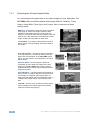
Figure 8, Figure 9, and Figure 10 illustrate how to wire a balanced/unbalanced
input and/or output connection:
Figure 8: Connecting a
Balanced Stereo Audio
Input/Output
20
Figure 9: Connecting an
Unbalanced Stereo Audio
Input
Figure 10: Connecting an
Unbalanced Stereo Audio
Output
VP-725NA - Connecting the VP-725NA Presentation Switcher/Scaler