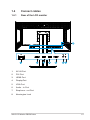
1
4.
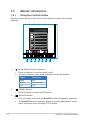
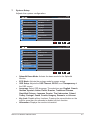
Input Select Button:
•
5.
Use this hotkey to switch from VGA, DVI, HDMI / MHL or DisplayPort
input signal.
Close Button
•
Exit the OSD menu.
•
This is a Shortcut key. The default setting is Brightness.
6.
Shortcut key1
7.
Shortcut key2
•
This is a Shortcut key. The default setting is Blue Light Filter.
ASUS LCD Monitor PB258 Series
1-5