1
60
en | Common User Commands
MIC Series 550
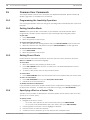
4. Activate the wash/wiper function. Press 1 and then AUX-ON on the keyboard. The camera
moves to preset 62. The nozzle sprays cleaner onto the camera window, and then the wiper
wipes the window. The camera then returns to where it was positioned previously, or it
continues to perform the tour that it was performing when you activated the wash/wipe
function.
Notice!
Depending on your camera settings, your monitor may display a freeze frame image of the
wiper during or at the end of the wipe cycle. If you prefer not to see this freeze frame, you
can turn off the Freeze Frame on Preposition in the PTZ Setup menu.
15.8
Using the Wiper/Washer (Bosch Protocol)
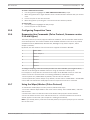
To activate the washer/wiper function, press ON-105-ENTER and confirm this sequence:
1. The wiper moves to a predefined position.
2.
The washer turns on for five seconds. Simultaneously, the wiper turns on and wipes five
times.
3.
The washer turns off. The wiper turns off.
4.
The camera returns to its previous PTZ position (and to inactive mode if applicable).
To activate the wiper manually (or if the corresponding alarm was activated or
deactivated):
Press ON-102-ENTER.
Note: The wiper will turn off automatically after 5 minutes of use.
To activate intermittent wipe:
Press ON-103-ENTER. The wiper wipes twice, then returns to parked position, and then turns
off 15 seconds later.
To activate the wiper to wipe five (5) times:
Press ON-104-ENTER. The wiper wipes five times, then returns to parked position and turns
off.
Notice!
If the power fails while the wiper is activated, the wiper will return to parked position, after
power is restored, before turning off. The wiper will not stop in front of the camera window.
15.9
Configuring Settings for IR Illumination
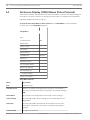
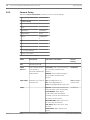
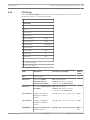
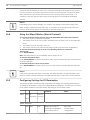
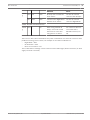
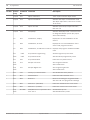
The following table provides the valid combinations of settings for activating IR illumination.
To activate IR illumination, set the menus Night Mode, IR Illuminator, and IR Focus Correction
to the values identified in the table below, depending on your desired results.
Menu
Nigh
IR
t
Illuminato Correctio
Mod
r
RESULTS
Notes
Within 10 seconds of
This is the
switching to Night Mode,
recommended
the IR lamps turn on.
configuration.
IR Focus
n
e
Model: MIC550IR
Auto Auto
November 2011 | | F.01U.239.454
Auto
Operation Manual
Bosch Security Systems, Inc.