1
StyleView Carts
™
FREE!
Free, industry leading StyleLink Software
with enterprise capabilities
StyleLink’s three-part software package (Enterprise, Client, Graphing Tool)
offers broad system and platform compatibility for global healthcare customers
deploying Ergotron StyleView Carts with power.
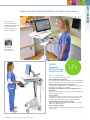
Bifocal viewing adjustment for caregivers
and true ergonomics for seated work
Extend Asset Life Cycle
Optimizes balance between runtime and cycle life
Helps prevent deep discharging, which maximizes battery cycle life and
minimizes battery replacement cost
Proactive Power System Management
Eliminate surprises through use of diagnostic tools, simplifying power system
management and reducing time required to fix problems
Email alerts sent by each cart at different stages of battery life facilitate
proactive power system management
Remote configuration: remotely configure or change email alerts, names,
passwords and communication thresholds on each cart, or a group of carts,
using your MS Network
Reduce Total Cost of Ownership
Reduce costs for maintenance; eliminate need for expensive onsite technical
support by leveraging diagnostic capabilities. Simply email StyleLink’s history
data file to Ergotron Tech Support and they will help troubleshoot power system
performance issues
Plan battery replacement based on custom views or email alerts, rather than
being surprised by a (higher cost) replacement situation during caregivers’
active work hours
Enterprise Capabilities
Remote enterprise monitor: access your carts across WAN, LAN, or VPN to get
real-time information
Custom views: view those carts that meet your specific rules, e.g., carts
unplugged, carts not connected, carts not reporting in the last 7 days, etc.
Group view: organize your carts into groups and subgroups. Set views for
specific areas of your facilities; troubleshoot power system performance issues
Advanced Drawer Management
Each drawer individually controlled with PIN; program locally or remotely via
enterprise
Drawer event log and report capability
Two points of console access for PIN updates: Unit Clerk or IT
Get real-time centralized control over
mobile computing deployments across
multi-facility healthcare campuses.
Dynamic Icon
•Green/Yellow/Red
•Corresponds to
Charge Remaining
Charge Remaining
•0–100%
•Color Coded to Match RUI
Time Remaining
•Hours, Minutes
•No Load
•Charging
Percent Load
•0–100%
•Color Coded to Show
Preferred Load Range
Power Source
•Line Mode
•Battery Mode
•Not Connected
System Fault
•No Fault
•Temperature High
•Not Connected
12
System Metrics
In Real Time
Battery
•Good
•Replace
•Unknown
Drawer
•Normal
•Illegal Drawer Opening
•Drawer Fault
For display compatibility, visit www.ergotron.com