1
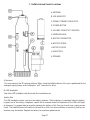
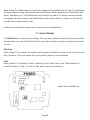
4) VOLTAGE PRESENT LED (red)
This LED flashes when AC or DC voltage is present (see Specifications for details). In the OFF / VOLTAGE
TEST and CONTINUITY modes, the flashing is accompanied by the beeper sounding. In the TRACER TONE
mode, the Voltage Present LED will flash to indicate a voltage, but the beeper will not sound.
5) PULSE / WARBLE Button
This button allows the user to select the ‘tone’ of the Tracer Signal. When PULSE is selected (button ‘in’),
the Tracer Signal is a tone that pulses on and off. When WARBLE is selected (button ‘out’), the Tracer
Signal is a tone that shifts up and down in pitch. The user may choose either setting. It is often found that
the WARBLE setting works better when detecting a “null” (more on this later).
6) TrueTrace ON/OFF Button
TrueTrace allows the user to positively identify a pair of wires, but it only works when certain conditions
are satisfied. In some instances, it may cause a ‘peculiar’ or an undesired behavior of the HotWire Fox. If
this occurs, this button allows TrueTrace to be turned off. TrueTrace is ‘on’ when the button is ‘in’. Its ‘off’
when the button is ‘out’.
7) RF LEVEL Control
This knob allows the RF level of the Tracer Signal to be adjusted (the level of the AF signal is fixed, and not
adjusted by this knob). While in many cases, the strongest signal is best, in some cases, too strong of a
signal will ‘overload’ the HotWire Hound, or may cause excessive crosstalk into adjacent wires or conductors.
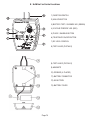
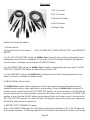
8) Test Leads
The short ‘pigtail’ Test Leads connected to the HotWire Fox are designed to connect to the 2’ or 5’ leads.
Either of these leads can be used to connect to any of the supplied probes.
9) Magnets
Magnets on the rear of the HotWire Fox allow it to be temporarily attached to steel surfaces, like electrical
panels, appliances, junction boxes, etc.
10) Screws
4 screws hold the case of the HotWire Fox together. Remove these screws to access the fuses.
11) Battery Connector
The battery connector mates to a standard 9V battery
12) 9V Battery (not included)
13) Battery Cover
The battery cover allows access to the 9V battery which can be used to power the product. Always replace
the battery cover before using the product. Using the product without the cover in place is dangerous and
may injure the user.
Page 16