1
2
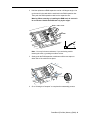
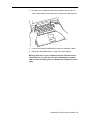
Hold the replacement RAM expansion card at a 30-degree angle. Line
up the notch in the card with the small tab in the RAM expansion slot.
Then push the RAM expansion card into the expansion slot.
Warning: When removing or installing the RAM card, do not touch
its connectors. Handle the RAM card only by the edges.
30 o
Note: You may feel some resistance. If you are having trouble
inserting the card, try pushing one side at a time.
3
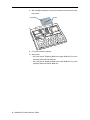
Gently push the RAM expansion card down until the two snaps on
either side of the card lock into place.
Snap
4
Go to “Closing the Computer” to complete the reassembly process.
PowerBook (FireWire) Memory (RAM) - 8