1
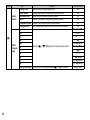
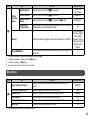
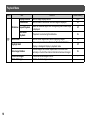
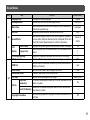
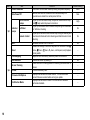
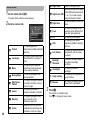
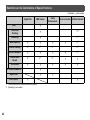
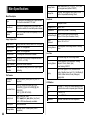
Menu List
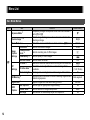
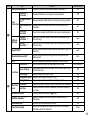
Rec. Mode Menus
Menu
Item
Exposure Mode *1
Custom Image
A1
*2 *4
Scene Mode *3 *4
File Format *4
JPEG Recorded
Image
Pixels *4
Capture
Settings
JPEG Quality *4
RAW File Format
AF Mode *4
AF
AF Active Area *4
Settings
AF Assist Light *4
AE Metering *4
*4
Digital Filter
HDR Capture *4
HDR
Bracket Value *4
Capture
Auto Align
12
Function
Temporarily changes the exposure mode when the mode dial is
set to O or P.
Sets the image finishing tone such as color and contrast before
shooting an image.
Selects the scene mode that best suits the situation. (S mode)
Sets the file format of images.
Sets the recording size of JPEG images.
Sets the quality of JPEG images.
Sets the RAW file format.
Selects the autofocus method when shooting with the viewfinder.
Selects the area to adjust the focus when shooting with the
viewfinder.
Discharges the assist light when autofocusing in dark locations.
Selects the part of the sensor to use for measuring brightness and
determining exposure.
Applies a digital filter effect when taking pictures.
Sets the type of high dynamic range shooting.
Sets the amount to change the exposure.
Sets whether to automatically adjust the composition.
Default Setting
G
Bright
Portrait
JPEG
q
m
PEF
z
Auto
(11 AF Points)
On
Multi-segment
No Filter
Off
±2EV
On