1
9
9. Alert Setting Mode
SET ALERT ?
Fig. 9a
MELODY 1
Fig. 9b
Enter this mode to select the different type of alerts:
• Standard Tone
• Melody
• Chirp
• Silent
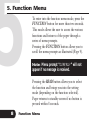
Press the FUNCTION button and hold for more
than 2 seconds to enter into the function menu
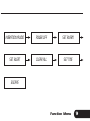
mode. Press the FUNCTION button to scroll
through the menu prompt until “SET ALERT? ”
prompt is displayed (Fig. 9a). Press the READ
button to enter into the set alert mode (Fig. 9b).
Next, Press the READ button twice to scroll
through the choice alerts available.
Beep1 / Beep2 / Beep3 / Beep4 / Melody1 /
Melody2 / Melody3 / Chirp / Silent
In the silent mode, pager continues to receive
messages though it will not emit any alert to prompt
the user.
Press FUNCTION button to select the desired
alert. Pager returns to standby after that.
Alert Setting Mode
13