1
Lines and extensions connection
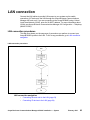
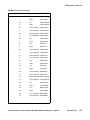
The 4x16 is connected using a 25-pair connector cable.
2
Connect the other end of the cable to the telephone company demarcation blocks of
the building.
3
To connect additional analog lines to a 4x16 MBM or BRIM, repeat step 1 and step 2
for each line.
--End--
Connecting to DSM16+, DSM32+, ASM8 MBMs
You can connect telephones to your Avaya BCM450 system through the DSM16+,
DSM32+, ASM8 MBMs.
Prerequisites
•
Obtain a 25-pair connector cable with an RJ-21 connector on one end.
•
Do not connect the digital station ports of the DSM16+, DSM32+, or combination
MBMs to the PSTN. Only approved digital telephones or peripheral devices can
connect to the DSM16+, DSM32+, and combination MBMs.
Attention: ASM8 does not support digital telephones.
Procedure steps
Step
Action
1
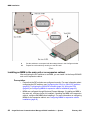
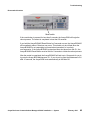
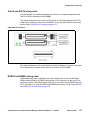
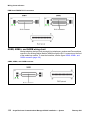
If you use the DSM16+, DSM32+, ASM8, or 4x16 MBM, plug the RJ-21 end of the
connector cable into the RJ-21 connector on the front of the MBM.
2
If you use a straight RJ-21 connector, secure the RJ-21 connector to the MBM with the
two supplied screws on the sides of the connector.
OR
If you use a right-angle RJ-21 connector, secure the RJ-21 connector to the MBM with
the supplied screw on the left side of the connector and with the supplied cable tie on
the right side of the connector to fasten the 25-pair cable to the anchor on the MBM.
3
Connect the other end of the cable to the local connecting blocks.
4
If you connect extensions to a DSM32, repeat step 1 to step 2 for the second RJ-21
connector.
--End--
56
Avaya Business Communications Manager 450 6.0 Installation — System
February 2011