1
12
Chapter 1 About Avaya 7406 Digital Mobile Handset
For the best radio reception, make sure the antenna on the
base station is always at a 90° angle to the base station.
Charging the Avaya 7406 Digital Mobile Handset Battery Pack
Warning: It is imperative that you follow the steps in this section when you first
initialize a base station and configure the first handset.
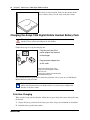
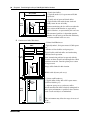
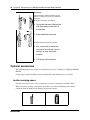
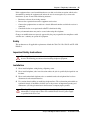
Follow these steps to set up the charging unit:
1. Plug the small end of the
power adapter into the back
of the charger.
2. Plug the power adapter into
an AC outlet.
The back port (battery port) on the
charger is used to charge the battery
pack on its own.
The front port supports the handset with
an installed battery pack.
The rechargeable battery pack must be fully charged before you use your Avaya 7406 Digital
Mobile Handset for the first time.
Note: Multiple handsets — If you are installing a number of handsets at once,
follow these instructions for each handset before you start trying to configure the
handsets to the base station.
First-time Charging
When you first setup your new handset, follow these steps to charge the battery and install it into
the handset:
1
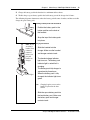
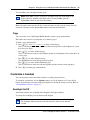
Charge the battery pack in the back battery port of the charger for a minimum of 30 minutes.
2
Install the battery pack in the handset.
NN40110-300