1
MAINTENANCE & TROUBLESHOOTING
This section describes how to:
•clean the lens
•replace the projection lamp
•replace the batteries in the remote
•use the Kensington lock feature
•troubleshoot the projector
Cleaning the Lens
Follow these steps to clean the projection lens:
1 Apply a non-abrasive camera lens cleaner to a soft, dry cloth.
• Avoid using an excessive amount of cleaner.
• Abrasive cleaners, solvents or other harsh chemicals might
scratch the lens.
2 Lightly wipe the cleaning cloth over the lens in a circular
motion.
3 If you don’t intend to use the projector immediately, replace
the lens cap.
Replacing the Projection Lamp
The lamp hour counter in the Status menu counts the number of
hours the lamp has been in use. Replace the lamp when the
brightness is no longer acceptable. You can order new lamp modules from you Boxlight. See “Accessories” on page 36 for information.
Follow these steps to replace the projection lamp:
WARNING: To avoid burns,
allow the projector to cool for at
least 30 minutes before you open
the lamp module door. Never
extract the lamp module while the
1 Turn off the projector by unplugging the power cord.
lamp is operating.
2 Wait 30 minutes to allow the projector to cool thoroughly.
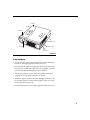
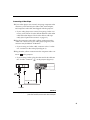
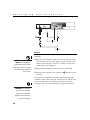
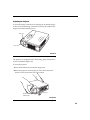
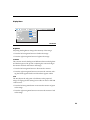
3 Invert the projector on a flat surface, then insert a small screwdriver or other flat object into the tab on the lamp module
door (Figure 19).
27