1
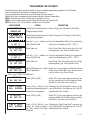
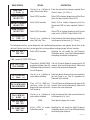
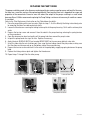
MENU SCREEN ACTION RINSE TIME ?
(-) 12 Hrs (+)
DESCRIPTION
Use the (+) or (-) buttons to Enter the desired time between required Rinse
adjust Rinse Alarm delay
Cycles in hours, [8 - 24 hrs.]
RINSE LOCKOUT ?
NO EXIT YES
Select (YES) to enable
Select YES to Lockout dispensing until the Rinse
Alarm has been cleared. Default is NO
BIB EMPTY LOCKOUT
NO EXIT YES
Select (YES) to enable
Select YES to Lockout dispensing until the
Concentrate BIB has been replaced. Default is
NO
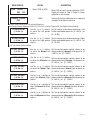
Select (YES) to enable
Select YES to Lockout dispensing until the hot
water tank is at READY Temp. Default is NO
BREW LOCKOUT ?
NO EXIT YES
DLY REPEAT DISP
(-) 0 SEC (+)
Use the (+) or (-) buttons to Enter the desired time delay before allowing the
adjust the Delay Time
next dispense to take place, [0 - 10 sec.]
The following functions are for diagnostic and troubleshooting purposes and typically do not have to be
adjusted. Contact your local service agent for assistance before making changes to these functions.
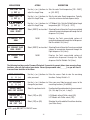
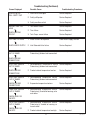
CAL LEFT SIDE ?
EXIT YES
Select (YES) to enable
Selecting Yes will enable the Left Dispenser
Calibration routine, (see Field Calibration before
attempting to calibrate the dispenser).
If NO - go to CAL RIGHT SIDE menu.
CAL LEFT PUMP ?
PULL DISPENSE
Place a 50 mL (#34843.1000) The Left Pump will dispense concentrate for 20
graduated cylinder under the seconds, then shut off automatically. Collect and
Left dispense tip, then activate measure the concentrate dispensed.
the Left Dispenser
CAL LF PUMP VOL
(-) 43mL (+)
Use the (+) or (-) buttons to Enter the volume of concentrate measured from
enter volume collected
the Left Pump in mL, (not Oz.) regardless of
Preferred Units selected.
CAL LF WTR FLOW ?
PULL DISPENSER
Place a 64 Oz. (2000 mL) The Left Dispenser will dispense hot water for 20
container under the Left seconds, then shut off automatically. Collect and
dispense tip, then activate the measure the water dispensed.
Left Dispenser
CAL LF WTR VOL
(-) 36.0OZ (+)
Use the (+) or (-) buttons to Enter the volume of the water measured from the
enter volume collected
Left dispenser in Oz. (mL).
CAL LEFT SIDE ?
EXIT YES
CAL RIGHT SIDE ?
EXIT YES
NONE
Scroll down to bypass this screen.
Select (YES) to enable Selecting Yes will enable the Right Dispenser
Calibration routine.
Calibration routine, (see Pump Calibration) prior
to calibrating the dispenser.
15
34766 120105