1
Advanced Features via PocketWizard Utility
Advanced features in the MiniTT1 and FlexTT5 are
available when using the PocketWizard Utility and
connecting your radio to your PC or Mac via a USB
cable. Be sure to install the Utility before connecting!
Download the latest version of the Utility at
PocketWizard.com here. Be sure to read the help
within the Utility for more information on how to
use it.
Turn your radio on before connecting to your computer
and you will see battery level in addition to detailed
status information.
PocketWizard Utility
Review the Reset section in this manual to understand
more about the features set in the Utility and how you
can revert them to their factory defaults in the field.
Firmware: The Maintenance section of the Utility is your
portal to firmware updates via the internet.
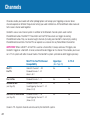
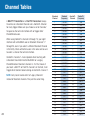
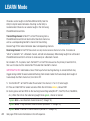
Channels: Within the Utility you can set the channels that
will be used for C.1 and C.2. See the Channels and Learn
Mode sections in this manual for more information on how
setting channels works in the field and via the Utility.
MiniTT1 USB port
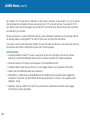
HyperSync: This powerful feature is set within the Utility.
See the HyperSync section of this manual for more
information.
20
FlexTT5 USB port