1
Chapter 3
Installing WLSE 1130-19 Hardware
Installing the WLSE 1130-19 in a Rack
When installing and servicing the WLSE:
•
Disconnect all power and external cables before installing the system.
•
Install the system in compliance with your local and national electrical codes:
– United States: National Fire Protection Association (NFPA) 70; United
States National Electrical Code.
– Canada: Canadian Electrical Code, Part, I, CSA C22.1.
– Other countries: If local and national electrical codes are not available,
see IEC 364, Part 1 through Part 7.
•
Do not work alone under potentially hazardous conditions.
•
Do not perform any action that creates a potential hazard to people or makes
the equipment unsafe.
•
Do not attempt to install the WLSE in a rack that has not been securely
anchored in place. Damage to the system and personal injury may result.
•
Due to the size and weight of the computer system, never attempt to install
the computer system by yourself.
See Precautions for Rack-Mounting, page 2-10 for additional safety information
on rack installation.
Warning
To prevent bodily injury when mounting or servicing this unit in a rack, you
must take special precautions to ensure that the system remains stable. The
following guidelines are provided to ensure your safety:
•
This unit should be mounted at the bottom of the rack if it is the only unit in the rack.
•
When mounting this unit in a partially filled rack, load the rack from the bottom to the
top with the heaviest component at the bottom of the rack.
•
If the rack is provided with stabilizing devices, install the stabilizers before mounting
or servicing the unit in the rack. Statement 1006
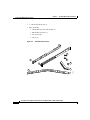
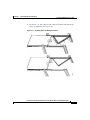
The server can be installed in a system 1U rack. The rack rail components are as
follows (numbers in parentheses refer to Figure 3-1):
•
2 telescopic rails (1, 2)
Installation and Configuration Guide for the CiscoWorks Wireless LAN Solution Engine
78-16345-01
3-3