1
8. INSTALLATION AND WIRING
1. Before Starting
Read these instructions and the following precautions carefully.
WARNING!
Be sure to disconnect the battery (-)
terminal before starting. This is to
prevent short circuits during installation.
Precautions
• This unit is exclusively for cars with a negative ground, 12V
power supply.
• Do not open the case. There are no user-serviceable parts
inside. If you drop anything into the unit during installation,
consult your dealer or an authorized Clarion service center.
18
VS735
• Use a soft, dry cloth to clean the case. Never use a rough
cloth, thinner, benzene, alcohol, or other solvent. For tough
dirt, apply a small amount of cold or warm water to a soft
cloth and gently wipe.
2. Package Contents
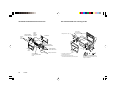
1 VS735R disc unit
2 DCP Case
3 IR Remote control
4 (2) AAA Alkaline Batteries (for remote control)
5 Trim Bezel
6 DIN Mounting Sleeve and release tools
7 (4) M4x6 Truss-head machine screws
8 (4) M5x5 Truss-head machine screws
9 (4) M5x5 Flat-head machine screws
10 (4) M5×18 Hexagon washer-head tapping screws
11 (2) M5 Hexagon nuts
12 (1) Plain washer
13 (1) Spring washer
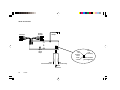
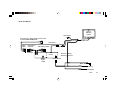
14 5-meter 4-pin Power Supply harness
15 5-meter RCA Audio Cable
16 5-meter RCA Video Cable
17 Additional IR Receiver (with 5-meter cable)
18 Installation Brackets
19 Backstrap
20 Owner’s Manual / Installation Guide