1
Battery Operation
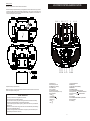
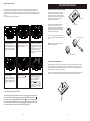
LOCATION OF CONTROLS AND INDICATORS
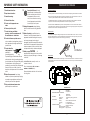
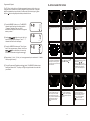
The battery compartment is located on the back of the cabinet.
* Remove the battery compartment door by pressing downward on the two tabs as shown in figure below.
,
* Insert 8 D size (UM-1) batteries into the battery compartment as shown in figure 2 below. Be sure to
observe the polarity markings which are engraved inside the battery compartment. If the batteries are
inserted incorrectly, the unit will not operate.
,
2 4 6
1.5V
1.5V
1.5V
1.5V
3
12 8 5
15 13 16
17 7
18 21
9
11 1 10
19 2014
8 x R20 D CELL UM-1
1.5V
1.5V
1.5V
1.5V
* Replace the battery compartment door.
NOTE: The AC power cord must be disconnected from the AC socket on the back of the unit in order
for the unit to operate on battery power.
BATTERY PRECAUTIONS
Follow these precautions when using batteries in this device.
1. Use only the size and type of batteries specified .
2. Be sure to follow the correct polarity when installing the batteries as indicated in the battery
compartment. Reversed batteries may cause damage to the device.
3. Do not mix different types of batteries together (e.g. Alkaline and Carbon-zinc) or old batteries
with fresh ones.
4. If the device is not to be used for a long period of time, remove the batteries to prevent damage
or injury from possible battery leakage.
5. Do not try to recharge batteries not intended to be recharged, they can overheat and rupture.
,
(Follow battery manufacturer s directions.)
-4-
1. FM Rod Antenna
2. Stereo Headphone Jack
3. POWER Switch (ON/OFF)
4. VOLUME Control
5. Carrying Handle
6. AC Socket (Rear of Unit)
7. Battery Compartment (Rear of Unit)
8. Cassette Buttons :
PAUSE ( )
STOP/EJECT ( )
FAST FORWARD ( )
REWIND ( )
PLAY ( )
REC ( )
9. CD Door OPEN Button
10. BAND Button
11. FUNCTION (CD/TAPE/RADIO)
12. DBBS Button
13. CD MEMORY Button
14. CD PLAY/PAUSE/PRESET-UP Button
15. CD Skip Reverse (
)/TUNING-DOWN Button
16. CD Skip Forward (
)/TUNING-UP Button
17. CD Door
18. Cassette Door
19. CD STEREO/MONO/REPEAT Playback Button
20. CD STOP Button
21. LCD Display
-5-