1
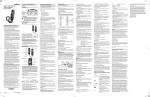
MODE SWITCH
Turns other equipment on and off, as selected
with MODE switch
TV INPUT
Changes the “source” — the piece of equipment
whose signal is displayed on your TV
AV1
REPLAY
You’ll find you can get around nearly all onscreen
menus the same simple way.
REWIND
TV
POWER
OFF
PLAY
FFWD
RECORD
PAUSE
EX
IT
ACTIVE
Note: Don’t worry about getting stuck in a menu. You can always
press EXIT to return to video.
Takes you to the screen you visited previously
2. Insert 2 AA batteries (supplied), matching
the positive (+) and negative (–) at each end.
3. Slide the cover back on to complete installation.
SELECT
Selects any highlighted item
1. See “Programming Your Remote Control” on
page 20.
Exits any menu and returns to last channel viewed
ARROWS
BA
CK
Move highlight to items in any direction needed
O
MENU
INF
INFO
Displays info for a highlighted or fullscreen
program
BLUE
MENU
VOL
CHAN
In Guide, jumps 12 hours back; other functions
vary — look for onscreen hints
GREEN
In Guide, jumps 12 hours forward; other functions
vary — look for onscreen hints
VOLUME
Raises or lowers volume
MUTE
Toggles sound volume on/off
Tune to a channel directly; also input numbers and
letters when needed in onscreen menus
PAGE
Displays a compact menu of settings and services
RED
LIST
Displays your To Do List
EXIT
SELECT
BACK
NUMBER KEYS & DASH
To program your remote control:
LIST
ACTIVE
Displays the DIRECTV Interactive Home Page—
local weather and more!
Displays the onscreen program Guide
1. Remove cover from the battery compartment by
sliding it downward.
ADVANCE
R
4Choose it… by pressing SELECT while the item
is highlighted.
To place batteries in your remote control:
Turns your TV and DIRECTV Receiver on and off
ON
PWR
GUIDE
Quick Tip
TV POWER ON/OFF
AV2 TV
TV
INPUT
STOP
Navigating 101
4Highlight… a menu or button by using the
ARROW keys (up, down, left and right).
POWER
Changes remote to control other equipment,
for example, a DVD
E
®
ID
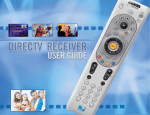
A good way to begin learning about your
DIRECTV System is to familiarize yourself with
the remote control. You’ll find further details
throughout the User Guide relating to specific
functions.
Keys in the shaded area below can be programmed to function with your VCR, DVD player or stand-alone DVR unit.
GU
Great TV viewing is in your
hands!
In live TV, displays the Mini Guide; other functions
vary — look for onscreen hints
YELLOW
MUTE
1
PREV
2
3
ABC
DEF
4
5
6
GHI
JKL
MNO
7
8
9
PQRS
TUV
WXYZ
0
DASH
ENTER
In fullscreen TV, cycles through alternate audio
tracks; other functions vary — look for onscreen
hints
CHAN/PAGE
In live TV, changes channel up or down; in a menu,
such as the Guide, scrolls page up or down
PREV
Tunes to last channel viewed
ENTER
Activates number entries quickly