1
Chapter 3 Setup
3.2 Eco-mode
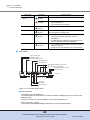
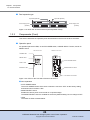
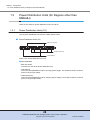
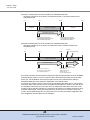
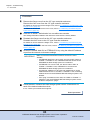
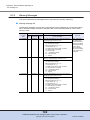
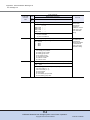
(Example 1) Setting the Eco-mode schedule via ETERNUS Web GUI
Operation schedule is set as 9:00 to 21:00 and there are no accesses outside of the
scheduled period
9:00
1:00
Stopped
0:00
21:00
Scheduled Operation
Stopped
Disk Motors Running
Disk motors are spun up
30 minutes before the start of
the scheduled operation
Disk motors are stopped
30 minutes after the end of
the scheduled operation
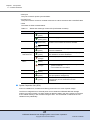
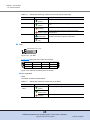
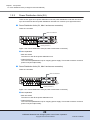
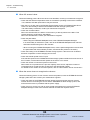
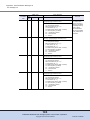
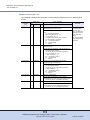
(Example 2) Setting the Eco-mode schedule via ETERNUS Web GUI
Operation schedule is set as 9:00 to 21:00 and there are accesses outside of the
scheduled period
1:00
9:00
21:00
Scheduled Operation
Disk Motors Running
Disk motors are spun up
30 minutes before the start of
the scheduled operation
Access
Access finishes
Stopped Operation
Stopped
Disk Motors Running
Access OK in
one to three minutes
Disk motors are
stopped 30 minutes
after the end of
the scheduled operation
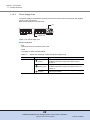
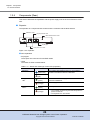
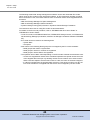
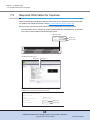
• Eco-mode schedules are executed according to the date and time that are set in the ETERUS
DX Disk storage system. To turn on and turn off the disk motors according to the schedule
that is set, use the Network Time Protocol (NTP) server in the date and time setting in
ETERNUS Web GUI to set automatic adjustment of the date and time.
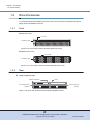
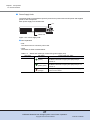
• Up to eight 2.5" drives or four 3.5" drives can be activated at the same time in a single drive
enclosure. When these maximums are exceeded, the first eight 2.5" drives or four 3.5" drives
are activated, followed by the rest of the drives in matching increments for each size. If the
number of drives that are activated in a single drive enclosure is increased, the time for drive
activation takes longer, causing the response times for the server to increase, which may
result in access paths being lost. To prevent this from occurring, the RAID configuration and
drive installation must be taken into consideration.
45
ETERNUS DX60 S2 Disk storage system User’s Guide -OperationCopyright 2012 FUJITSU LIMITED
P3AM-5512-03ENZ0