1
18
ProBridge Ethernet
User Manual
ins entered followed by the enter key. Changing the selection to
on allows the PBe to monitor the incoming Ethernet packets.
Note:
Monitor mode should be turned off before upgrading the PBe.
In some cases whenever SW3 is used to select the Ethernet
Device, monitor mode will automatically be turned on.
Analyzer Mode menu
This menu is used for troubleshooting only. Do not use unless
requested by a qualified technician.
Exiting HyperTerminal
To exit HyperTerminal do the following:
1. Enter the number 1 and the enter key until the message
“Exiting menus Ready!” is displayed.
2. Close the HyperTerminal screen. You do not need to save
the session for your changes to take effect.
1. Remove the RS-232 cable and reconnect the PBe to the
DVR.
Manual DIP switch configuration
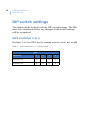
The Ethernet Device and Camera Selection can also be selected
manually by changing the DIP switch setting see DIP switch
settings on page 20. Follow the steps below to change the DIP
switches:
1. Disconnect power from the PBe
2. Disconnect the PBe from the DVR.