1
CD
English
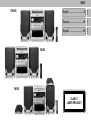
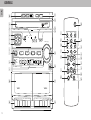
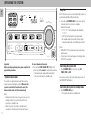
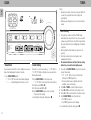
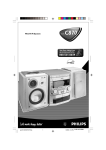
Loading the CD Changer
DISC
1
DISC
2
DISC
3
DISC CHANGE
OPEN • CLOSE
1 Press CD to select CD mode.
2 Press OPEN•CLOSE.
™ The CD compartment slides out.
3 Load a CD with the printed side up in the right tray.
• You can load another disc in the left tray.
• To load the third disc, press the DISC CHANGE button.
™ The CD changer carousel will rotate until the empty
tray is at the right hand side and is ready for loading.
™ Playback will always start with the disc in the outer
right disc tray.
4 Press OPEN•CLOSE to close the CD compartment.
™ The total number of tracks and playing time of the
last selected disc appear on the display.
3CD
CHANGER
3 CD ROTARY CHANGER SYSTEM • CD SYNCHRO RECORDING
RDS
OPTIMAL
DSC
TECHNO
STEREO
NEWS
REPLAY
JAZZ
FM
REC
HSD
MW
DBB
IS
LW
AM
PM
CLOCK
TIMER PROGRAM
MAX
DBB
REPEAT SHUFFLE
PROGRAM TIMER
ROCK
NEWS!
MAS
TER VOLUME
DIGITAL SOUND CONTROL
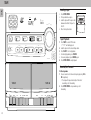
CD Direct Play
CD
TUNER
CD 1 • 2 • 3
▲
▲
BAND
▲
▲
TUNING
AUX
TAPE 1 • 2
DEMO
You can play a CD directly by pressing the DISC 1, DISC 2
or DISC 3 button. The CD player will stop at the end of
playback of the selected disc.
VIDEO
▲
STANDBY. ON
DUBBING
TAPE
PRESET
▲
DUBBING
n
• FAST
• NORMAL
NORMA•HIGH
RECORD
MIC
REPLAY
SEARCH
STOP•CLEAR
PLAY
PAUSE
PREV
LEVEL
NEXT
•MAX
Warning!
1) This system is designed for conventional CDs. Do not use any accessories like disc stabilizer rings or CD
treatment sheets, etc., which may damage the CD mechanism.
2) Do not load more than one disc into each tray.
3) When the CD changer is loaded with CD(s), do not turn over or shake the system. This may jam the changer.
You can load up to three discs in the CD changer for continuous playback without interruption.
16
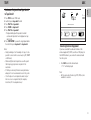
– When the button is lighted, it indicates that there is a
disc loaded in the disc tray.
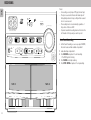
Playing a CD
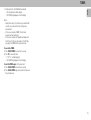
1 Press PLAY É to start playback.
™ The disc tray, track number and elapsed playing time
of the current track appear on the display.
• To interrupt playback, press PAUSE Å.
™ The playing time flashes.
• To resume playback, press PLAY É again.
2 To stop playback, press STOP•CLEAR Ç.