1
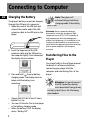
Music & Audible Playback
Repeat Playback
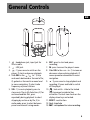
1. Press M once or twice to access to
player menu (refer to page 8 for more
details).
2. Slide to the + or – to highlight
“Repeat”.
3. Press SEL repeatedly to select a repeat
mode (Repeat One , Repeat All
and Repeat Off). The corresponding
icon lights on the display.
Note: repeat playback is not available
for audible files.
• Press SEL once while you are listening
to a preferred music file with “Added
to MySel” shows on the display briefly.
• Press SEL once while you are browsing
music files in the navigation menu,
“Added to MySel” shows on the
display briefly (see “File Menu - How
Files are Organized” and “File Menu
Navigation” for details).
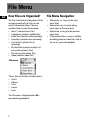
2. Select “My Selections” folder from the
file menu (see “File Menu - How Files
are Organized” and “File Menu
Navigation” for details).
3. Press
to begin playback.
DSP
DSP feature consists a number of sound
effects.
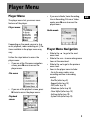
1. Press M once or twice to access to
player menu (refer to page 8 for more
details)
2. Slide to the + or – to highlight “DSP”.
3. Press SEL repeatedly to select an
effect mode (Flat, Bass, Pop, Rock and
Jazz).
Note: DSP is not available for audible
files.
• To clear My Selections, press M once
or twice to access to player menu
(refer to page 8 for more details).
Slide to the + or – to highlight “Clear
MySel” and then press SEL to confirm
clearing.
My Selections
My Selections is a playlist of your
preferred music files (audible, radio,
voice and line-in recorded files are not
selectable).
1. Select your preferred files in one of
the following ways:
10
EN