1
RCR660_NA_IB_REVA.qxp
3/13/06
3:24 PM
Page 2
Table of Contents
Product Diagram . . . . . . . . . . . . . . . . . . . . . . . . . . . . . . . . . . . . . . . . . . . .2
Introduction . . . . . . . . . . . . . . . . . . . . . . . . . . . . . . . . . . . . . . . . . . . . . . . .3
Battery Installation and Information . . . . . . . . . . . . . . . . . . . . . . . . . . .3
Battery Saver . . . . . . . . . . . . . . . . . . . . . . . . . . . . . . . . . . . . . . . . . . . . . . . .3
NaviLight Illumination Path . . . . . . . . . . . . . . . . . . . . . . . . . . . . . . . . . .3
Illuminated Component Names . . . . . . . . . . . . . . . . . . . . . . . . . . . . . . .4
Double Off Function . . . . . . . . . . . . . . . . . . . . . . . . . . . . . . . . . . . . . . . . .4
Programming the Remote . . . . . . . . . . . . . . . . . . . . . . . . . . . . . . . . . . . .4
Programming Methods
Brand Code Search and Entry . . . . . . . . . . . . . . . . . . . . . . . . . . .4
Direct Code Entry . . . . . . . . . . . . . . . . . . . . . . . . . . . . . . . . . . . . .5
Manual Code Search and Entry . . . . . . . . . . . . . . . . . . . . . . . . . .6
Auto Code Search and Entry . . . . . . . . . . . . . . . . . . . . . . . . . . . .8
Six-Component Universal Remote
Congratulations on your purchase of this advanced universal remote, which has the
capacity to control up to six components and makes juggling remote controls a thing
of the past. This unique remote is incredibly easy to use because, once you press the
key for the component you wish to control, only the key names needed to control
that component light up.
You can program your RCA brand universal remote to operate most models of most
brands of infrared, remote-controlled components manufactured after 1990. (See the
enclosed Code Lists for a complete list of brands.) This remote is unusually versatile
because it has a DVR·AUX key that you can program to control an additional
component. The six-component universal remote is easy to use, easy to program and
gives you control at the touch of your fingertips.
Code Retrieval . . . . . . . . . . . . . . . . . . . . . . . . . . . . . . . . . . . . . . . . . . . . . .9
Using the Remote to Control Your Components . . . . . . . . . . . . . . . .10
Volume Punch-through . . . . . . . . . . . . . . . . . . . . . . . . . . . . . . . . . . . . . .10
Advanced Punch-through . . . . . . . . . . . . . . . . . . . . . . . . . . . . . . . . . . .10
! TIP The six-component universal remote is already programmed to operate
most RCA, GE and PROSCAN branded TVs, VCRs, DVD players and satellite
receivers. Just press the corresponding key—DVD key for a DVD player; TV key for
a television; SAT·CBL key for a satellite receiver or a cable box, etc.
Transport Key Punch-through . . . . . . . . . . . . . . . . . . . . . . . . . . . . . . . .10
Sleep Timer . . . . . . . . . . . . . . . . . . . . . . . . . . . . . . . . . . . . . . . . . . . . . . . .10
Troubleshooting . . . . . . . . . . . . . . . . . . . . . . . . . . . . . . . . . . . . . . . . . . . .10
Warranty . . . . . . . . . . . . . . . . . . . . . . . . . . . . . . . . . . . . . . . . . . . . . . . . . .12
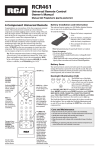
ON·OFF key
Battery Installation
and Information
Your universal remote requires two AA Alkaline batteries (batteries may or may not
be included, depending on model).
To install the batteries: 1. Remove the battery compartment cover.
2. Insert the batteries, matching the
batteries to the (+) and (-) marks inside
the battery compartment.
Component keys.
( SAT·CBL, VCR,
DVD, TV, AUDIO,
DVR·AUX.)
3. Press and push the battery cover back
into place.
Note: Reprogramming may be required after batteries
are replaced.
Dedicated MENU
key for DVD disc
menus, satellite
receivers and
some TVs.
INFO key –
Displays information
pertaining to the
component you are
currently controlling.
Navigation keys
(UP, DN, RT, LT
arrow keys)
Battery Saver
CHAN and VOL keys
Your universal remote control saves battery power by automatically turning off if
any key is pressed for more than 60 seconds. This saves your batteries should your
remote get stuck in a place where the keys remain depressed, such as between sofa
cushions.
NaviLight Illumination Path
Transport keys –
REVERSE, PLAY,
FORWARD,
RECORD, STOP
and PAUSE keys.
INPUT key –
Toggles through all
the video sources
connected to your
TV, when the remote
is in TV Mode. When
the remote is in VCR
Mode, it toggles
between VCR and
TV input.
SLEEP key – Allows
you to set a time to
turn off your TV
automatically.
The RCR660 uses a NaviLight illumination path to
light up the names of keys you need to operate each
component. For example, when you are in SAT
Mode, only the words above these keys light up:
ON/OFF, SAT·CBL, UP NAVIGATION ARROW,
LEFT NAVIGATION ARROW, RIGHT NAVIGATION
ARROW, DOWN NAVIGATION ARROW, GUIDE,
SKIP, MENU, INFO, CLEAR, VOL, CHAN,
VOL/CHAN UP ARROW, VOL/CHAN DOWN ARROW, MUTE, GO BACK,
ENTER, PIP/AUDIO and SWAP/SUBTITLE. Every key that has a function in the
mode you are in lights up.
The NaviLight illumination path remains lit for three seconds from the last keypress.
You can toggle the NaviLight illumination path on and off at any
time by pressing the LIGHT key or the desired component key.
Actual model
may vary from
picture shown.
2
3