1
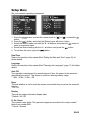
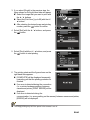
Initial Settings Setting the Date and Time The date/time needs to be set if and when: The camera is turned on for the first time. The camera is turned on after leaving the camera without the batteries for an extended period of time. When the date and time information is not displayed on the LCD monitor, follow these steps to set the correct date and time. 1. Press the button, and set the camera mode to [ ] or [ ]; or press the button. 2. Press the button. 3. Select [Setup] with the f button. 4. Select [Date/Time] with the c / d buttons, and press the button. 5. Select the date format with the c / d buttons, and press the button. Select the item’s field with the e / f buttons and adjust the value for the date and time with the c / d buttons. The time is displayed in 24-hour format. After confirming all settings are correct, press the button. 6. To exit from the [Setup] menu, press the button. EN-16