1
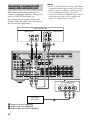
Connecting the DIGITAL MEDIA
PORT adapter
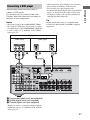
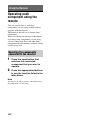
You can listen to the sound and view the
images from the component connected
through the DIGITAL MEDIA PORT adapter
to the DMPORT jack on the receiver.
TV
ANTENNA
AM
EZW-T100
IN 2
IN 3
IN 1
TV
SIRIUS
MONITOR
OUT
DMPORT
DC5V
0.7A MAX
Y
IN
OPTICAL
PB/
CB
VIDEO
IN
VIDEO
IN
VIDEO
OUT
VIDEO
IN
AUDIO
IN
AUDIO
IN
AUDIO
OUT
AUDIO
IN
A
VIDEO
OUT
PR/
CR
COMPONENT VIDEO ASSIGNABLE (INPUT ONLY)
OUT
IN
IN
MONITOR
L
AUDIO
OUT
R
SA-CD/CD/CD-R
TV
SAT
BD
VIDEO 1
SUBWOOFER
DIGITAL MEDIA
PORT adapter
A Video cord (not supplied)
DMPORT
DC5V
0.7A MAX
1
2
Notes
• When connecting the DIGITAL MEDIA PORT
adapter, be sure the connector is inserted with the
arrow mark facing towards the arrow mark on the
DMPORT jack.
• Be sure to make DMPORT connections firmly,
insert the connector straight in.
• As the connector of the DIGITAL MEDIA PORT
adapter is fragile, be sure to handle with care when
placing or moving the receiver.
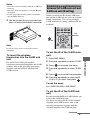
Press and hold both sides of the connector and
then pull out the connector.
97US
Other Operations
To detach the DIGITAL MEDIA
PORT adapter from DMPORT
jack