1
Operating Instructions
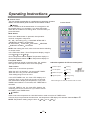
Control Panel
You can easily operate this air conditioner by pressing relevant
button on the control panel as well as the remote control.
Control Panel
Button
The air conditioner will be started when it is energized or will
be stopped when it is in operation, if you press this button.
When the air conditioner is heating, allow 3 minutes after you
press this button.
Mode button
Each time Mode button is pressed, the operation
mode is changed in sequence:
5K 6K 8K cooling only COOLING FAN ONLY
ENERGY SAVING COOLING
8K with heater COOLING FAN ONLY HEATING
ENERGY SAVING COOLING
Timer
NOTE: After setting the mode, allow 3 minutes before switching
to another mode.
In the FAN ONLY Mode , Room Temperature display range is
from 0 (32 ) to 38 (99 ).
Room Temperature below 32 ,the Temperature display L0.
Room Temperature above 99 ,the Temperature display H1.
Fan Speed button
Used to select fan speed in sequence auto, low, medium
and high (low and medium are in same fan speed).
Timer button
Used to set or cancel timer operation.
When the unit is in operation, you can set OFF TIMER.
When the unit is off, you can set ON TIMER.
Timer setting range is 0 to 24 hours.
If the OFF TIMER is set, the timer LED displays the
remaining time to turn off the unit for only 12 seconds,
then LED shifts to display set temperature. If you press
TIMER button within the 12 seconds, OFF TIMER will be
canceled.
Fan
Speed
Mode
Airconditioner
Indication symbols of LED on control panel :
Auto fan speed
Cooling
Low fan speed
Fan only
Medium fan speed
Heating
High fan speed
Energy-saving
F
h
Display set temp
Display set timer
Timer
Above LED lights on when the relevant mode is in used.
If the ON TIMER is set, the timer LED displays the
remaining time to turn on the unit. If you want to cancel
ON TIMER, press TIMER button.
Button
Used to set room temperature in COOLING mode or used to set time in TIMER mode.
If the two keys are pressed at the same time, the temperature LED display will alternate between
NOTE: Temperature setting range is from 19
(66
10
) to 31
(88
).
and
.