1
4 Introduction
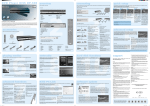
1.2.2 The remote control
1
⃝
button toggles the digital receiver between operation mode
and standby mode.
2
⃝
button mutes the television or
audio appliance.
¤
¡
3
⃝
£UHF ¢button displays the RF setting menu. For more descriptions, refer to § 3.2.6.
4
⃝
button toggles operation between the digital receiver and
your video recorder. For more
descriptions, refer to § 3.2.3.
5
⃝
button sets a sleep timer. The
digital receiver is turned off to
standby mode when a specified
duration is elapsed.
6 Numeral buttons are used to
⃝
specify a service to watch or a parameter such as timer.
¤
7
⃝
button makes a return to the
previous service.
8
⃝
button displays the information about the program on the air.
¡
9
⃝
£GUIDE ¢button displays an electronic program guide.
10
⃝
button toggles between TV mode and radio mode.
¤
¡
11 MENU button displays the menu, or escapes to a higher
⃝
£
¢
level menu out of a submenu.
12
⃝
button is used to select an audio track, a sound mode