1
mr
iGenie Control
.steam
__________________________________________________________________
™
®
INSTALLATION & OPERAT ION MANUAL
mr.steam
mr.steam®
43-20 34th Street
Long Island City, NY 11101 • 1 800 76 STEAM
iGENIE™ MODULE:
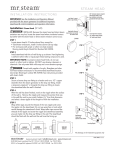
• The iGenie module is connected to and mounted near your steam
generator and normally does not require any attention.
Antenna
• The 4 lights on the iGenie Module indicate the status of the steam
iGenie Module
generator that it is connected to. At least one light will be on to
show you that the iGenie Module is operating.
• If the red light is on, the steam cycle is off. If the green light is on,
the steam cycle is on.
• If the red light is blinking there is an error condition in the steam
generator. An error code will be displayed on your iTempo,
iTempo/Plus or iSteam control. Contact the Mr.Steam Technical
Toggle Steam
Adjust Address
Service Department at 800-76-STEAM (East coast) or 800-72STEAM (West coast) for assistance or additional information.
• The yellow light flashes to indicate when the ON/OFF button on the
iGenie FOB is pressed.
Toggle Steam Address
Connection to Steam
• The blue light is on to indicate that you are in pairing mode.
button
button
Generator (on the side
of the Module)
• While in pairing mode, the green light will continuously flash the
iGenie Module address (1-8).
• You can turn the generator on and off by pressing either button on the iGenie Module (while not in pairing mode).
PAIRING
• The iGenie FOB and iGenie Module come paired from the
factory with address 1. The iGenie FOB and iGenie Module can be set to one of eight different addresses.
• Pairing is required if you have more than one steam generator in your home or if you experience interference from a
neighbor’s steam generator.
• You can determine the pairing of an iGenie FOB and iGenie Module by pressing and holding the ON/OFF button
for 2 seconds. If you are within range of the iGenie Module, the green light will flash from 1 to 8 times depending
on the address. To change the address of the iGenie Module, you must enter pairing mode.
• To enter pairing mode, press and hold the Toggle-Steam
button on the iGenie Module for 2 seconds until the blue
Mounting
Holes
STEAM OFF
STEAM ON
RF ACTIVITY
Press and Hold to
enter pairing mode
Green LED blinks
address in pairing mode
PAIRING
Status LEDs
indicator light comes on. The green indicator light will start
flashing the current address every 4 seconds. Count from 1
to 8 flashes. To change the iGenie Module address press the
Adjust- Address button. Observe that the flash increments
from 1 to 8 and then back to 1 each time you press it.
• To change the address of the iGenie FOB, to match the
address of the iGenie Module, press and hold the ON/OFF
button while the iGenie Module is in pairing mode. You will
see the new flash count on the iGenie FOB.
• To exit pairing mode, press the Toggle-Steam button on the
iGenie Module and observe that the blue light turns off.
Pairing mode will automatically exit after 60 seconds.
NOTE: The iGenie FOB and iGenie Module address are
maintained even when power is removed.
iGENIE BATTERY REPLACEMENT:
Your iGenie is equipped with a factory installed battery. A replacement
disk battery #CR2032 is available at most stores.
TO REPLACE THE BATTERY:
1. Using a flathead screwdriver or coin, turn the
battery door ¼ clockwise.
2. Remove the battery door.
3. Slide out the old battery.
4. Slide in a new battery making sure that the + side is
facing outwards (away from the circuit board).
5. Replace the battery door and using a flathead screwdriver
or coin turn it ¼ counterclockwise to close it.
6. Test the iGenie
Battery
Battery
Door/Magnet
FOB
Case
NOTE: The iGenie FOB will remember its address when the battery is removed
! CAUTION The battery and battery door are small pieces, keep out of reach of children.
3