1
Chapter 3 Running MICRESS
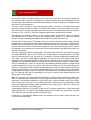
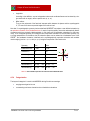
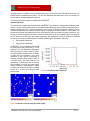
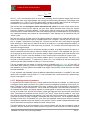
At the beginning of the simulation, for all seed types which use the seed density model, discrete positions with
discrete radii for the potential nucleation sites are determined and stored. During the simulation run, nucleation
is checked only at these predefined places.
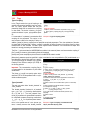
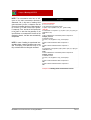
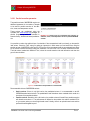
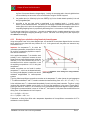
Driving File
These seeding particles are not “consumed“ by
nucleation and cannot move. An exception is …
the “moving_frame“ option in the section # Data for further nucleation
“boundary conditions“: If this option is selected, # ====================
…
the predefined nucleation sites move with the # Which nucleation model shall be used?
frame, the sites which move out at the bottom # Options: seed_undercooling seed_density
of the domain are copied to the top line in order seed_density
to keep the density of nucleation sites constant. # Integer for randomization?
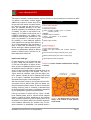
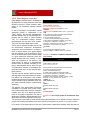
If “seed_density“ is selected, the user first has
to specify an integer for randomization. The
random number generator has to be initialized
with an arbitrary integer number (see Example
3.23). This ensures that, e.g., inserting a new
nucleation type would not change the random
positions of all other types for a given MICRESS® example.
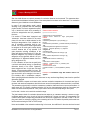
In the seed density model, the size distribution
of potential nucleation sites (seeding particles)
is described in terms of classes with different
radii [µm] and density [cm-3]. For each class,
the number of potential nucleation sites is calculated according to the given density and the
volume of the simulation domain.
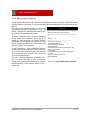
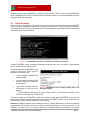
111
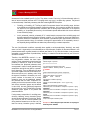
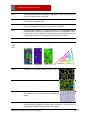
# How many classes shall be chosen for the critical radius?
6
# Specify radius [micrometers] and seed density [cm**-3] for class
1.4 2.E5
# Specify radius [micrometers] and seed density [cm**-3] for class
1.2 4.E5
# Specify radius [micrometers] and seed density [cm**-3] for class
1.0 1.E6
# Specify radius [micrometers] and seed density [cm**-3] for class
0.8 2.4E6
# Specify radius [micrometers] and seed density [cm**-3] for class
0.6 5.E6
# Specify radius [micrometers] and seed density [cm**-3] for class
0.5 1.0E7
…
1
2
3
4
5
6
Example 3.23 Further nucleation using the seed density
model
Note: In 2D simulations, the given 3D density is transformed to an equivalent 2D density which has the same
average distance between the seeding particles as it would have in 3D.
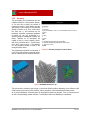
Using the given density, explicit positions of the potential nucleation sites are determined. The radii (and thus
the local critical undercooling for nucleation on each particle) are distributed evenly according to the radius
range of each seed class. Inside each class, a random radius distribution is assumed. The radius range corresponds to the radius difference to the next specified class. The finally created numbers and radius ranges for
each class can be found in the .log-file.
Note: The seed classes must be specified starting with the highest radius values. At least two classes should
be specified, otherwise the automatically assumed radius range may lead to unexpected results.
Optionally, an additional clustering of the randomly distributed seeds can be obtained. This is done by specifying an additional cluster radius and a cluster density in the same line for each class (i.e. four real numbers in
each line). The option can be helpful if experimentally a clustering of primary precipitates is observed like in
some hypereutectic Al-Si alloys.
Seed undercooling model
In contrast to the seed density model, no explicit potential nucleation sites are predefined and the number of
grains which can nucleate during simulation is not limited. Therefore, the user can specify a maximum number
of grains which are allowed for each seed type. If this number is exceeded, nucleation of this type stops without
MICRESS® User Guide Volume II: Running MICRESS
28/115