1
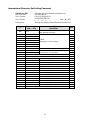
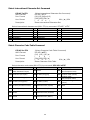
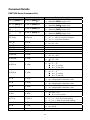
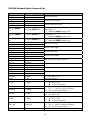
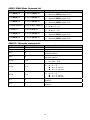
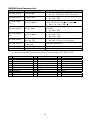
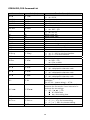
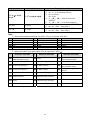
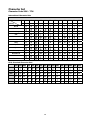
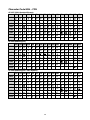
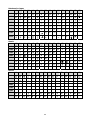
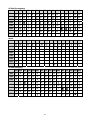
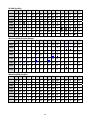
Command Code (hex) ESC W n s x1 y1 x2 y2 1B 57 n s x1 y1 x2 y2 ESC R n 1B 52 n ESC t n 1B 74 n Function Description Set or cancel the window range n = 1 ~ 4, for window number s = 0: cancel s = 1: set 1 ≦ x1 ≦ x2 ≦ 14h, for columns location. 1 ≦ y1 ≦ y2 ≦ 2, for lines location. Select international character set (20H~7Fh). n = 00 ~ 0Dh. See note *1 Select character code table (80H~FFh). n = 00 ~ 15h. See note *2 Note: 1. Select international character set (20H~7Fh) by command “ESC R n” n 00h 01h 02h 03h 04h International character set U.S.A. FRANCE GERMANY U.K. DENMARK I n 05h 06h 07h 08h 09h International character set SWEDEN ITALY SPAIN JAPAN NORWAY n 0Ah 0Bh 0Ch 0Dh International character set DENMARK II SLAVONIC RUSSIA ARABIC 2. Select character code table (80H~FFh) by command “ESC t n” n 00h Character code table CP-437 (USA, Standard Europe) n Character code table n Character code table Windows-1252 (West European Latin) 08h Greek 10h 01h Katakana (for Japan) 09h CP-852 (Hungary) 11h Windows-1253 (Greek) 02h CP-850 (Multilingual) 0Ah CP-862 (Hebrew) 12h 03h CP-860 (Portuguese) 0Bh CP-866 (Cyrillic) 04h CP-863 (Canadian-French) 0Ch Windows-1251 (Cyrillic) 05h CP-865 (Nordic) 0Dh Windows-1254 (Turkish) 06h Slawie 0Eh Windows-1255 (Hebrew) 07h Russia 0Fh Windows-1257 (Baltic) 47 Windows-1250 (East European Latin) CP-858 (Multilingual+ Euro 13h Symbol) 14h Arabic