1
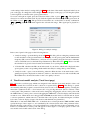
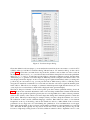
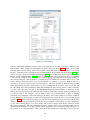
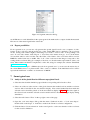
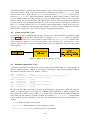
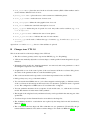
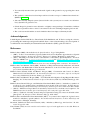
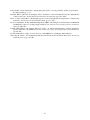
Figure 9: Consonant-vowel transition dialog.
the optimization. You can also optimize the vocal tract shape of plosives with respect to the formant
onset frequencies after their release towards a given vowel in the bottom part of the dialog.
Besides the level of the elementary vocal tract parameters, which are shown in the vocal tract shapes
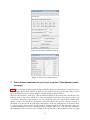
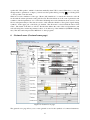
dialog, VTL provides another higher level of phonetic parameters to control the vocal tract shape. This
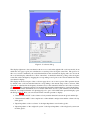
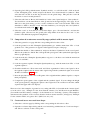
level of parameters is mainly meant for educational experiments. Click the button “Phonetic parameters” in the control panel or select “Synthesis models → Phonetic parameters” from the menu to open
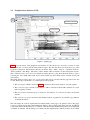
the phonetic parameter dialog shown in Fig. 11. There are seven parameters, which can be changed
by scrollbars. The parameters “Tongue height” and “Tongue frontness” specify the tongue shape for a
vowel. The actual shape is calculated by bilinear interpolation between the predefined shapes for the
corner vowels /a/, /i/, and /u/. The degrees of lip rounding and velum lowering are separately specified
by the parameters “Lip rounding” and “Velum position”. Finally, the parameters “Bilabial constriction
degree”, “Apico-alveolar constriction degree”, and “Dorso-velar constriction degree” can be used to superimpose consonantal constrictions of varying degrees on the vocalic configuration. When a parameter
is changed, the corresponding changes in the vocal tract shape, the area function, and the transfer function
are immediately displayed.
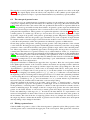
Independently of the model of the vocal tract, you can specify an arbitrary vocal tract transfer function in
terms of a pole-zero plot. This function is mainly meant for educational experiments. Generally, a polezero plot displays the poles and zeros of a rational transfer function in the complex plane. In the case of
the vocal tract system, the poles correspond to formants and the zeros to anti-formants. Therefore, the
pole-zero plot allows you to define a transfer function by means of formant and anti-formant frequencies
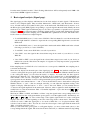
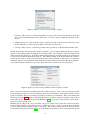
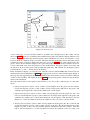
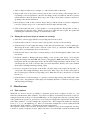
and bandwidths. To open the pole-zero dialog shown in Fig. 12, click the button “Edit pole-zero plot”
in the control panel. The left side shows the location of the poles (crosses) and zeros (circles) in the
bandwidth-frequency plane. To change the location of a pole or zero, drag it with the LMB. Right-click
in the display to call a context menu to add new or delete existing poles and zeros. Press the button
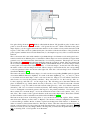
“Enter poles” to enter numerical values for formant frequencies. When the check box “P-Z-spectrum”
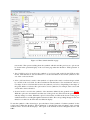
next to the spectrum display on the vocal tract page is checked, the transfer function corresponding to
the current pole-zero plot is shown. In reality, a vocal tract transfer function has an infinite number of
poles. When you want to approximate the effect of the higher poles (the ones above the highest pole that
you have placed in the plot) according to Fant (1959) then check the box "Higher pole correction" in the
pole-zero dialog (recommended). To play the short or long vowel sound corresponding to the current
pole-zero plot, press the button “Play short vowel” or “Play long vowel”. The audio signal for the vowel
is synthesized using the LF glottal pulse model with its current parameter settings and it is stored in the
main audio track.
12