1
CHAPTER 2. INPUT TO ARABTEX
2.2
12
Commands within an Arabic context
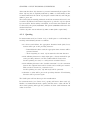
A control sequence inside an Arabic context should be separated from the preceding text item by white space or another control sequence, and may be of the
following kinds:
• ArabTEX option changing commands. These may also be used outside an
Arabic Context, and usually follow TEX’s grouping rules.
• \\ for a line break; the current line will be padded out on the left with
spaces.
• \| or \break for a line break; the current line will be spread out. If it comes
out very badly spaced, automatic stretching might help (see Section 8).
• \indent or \par (or a blank line) for a new paragraph, \noindent for a
new paragraph without indentation (not inside Arabic quotations).
• \emphasize {group of Arabic items} will put a bar over the indicated
group of Arabic items.
• \setnash, \setnashbf, \setnastaliq and other font selection commands, see Section 3.3.
• size changing LATEX commands like \large etc., only if LATEX is used!
• the following commands: \footnote (observe that the syntax for Plain
TEX and LATEX is different!), \marginpar (also with Plain TEX, analogous
to the LATEX usage).
• the TEX/LATEX commands \smallskip, \medskip, \bigskip, \input,
\hfill, \hfil, \vfill, \vfil, \ (for a space), \space, \, (small space),
\newpage, \clearpage, \pagebreak with their usual meaning.
• \nospace will place the adjacent items in the output in direct contact,
without any intervening space, except in case of a line break.
• \hspace{width} will introduce the indicated amount of spacing in the
output. The same is true for \vspace, \hskip (observe TEX syntax!), and
\vskip.
• \mbox{text } puts the text into a box that will not be split across a line
break.
• \spreadbox{width}{text } spreads out the text to the indicated width.
This may be useful e.g., when typesetting poetry.
\spreadbox{width}{text \hfill } will inhibit the spreading,
\spreadbox{width}{\hfill text \hfill } will center the text inside the
box.