1
CoboldPC
1.1.
General Introduction
Overview
Overview
CoboldPC is designed as a convenient data acquisition (DAQ) and online/offline data analysis (DAN) program for
Windows XP (recommended), Windows NT or Windows 95/98.
Due to its modular structure it can potentially address almost any hardware and allows very elaborate data treatments as
the analysis plug-in can be modified by the user. The interface between the main program and the hardware is done by a
dynamic link library named DAQ.dll while the analysis is performed by another link library named DAN.dll
With this program package you have received a DAQ.dll and at least one standard example analysis file DAN.dll suitable
for the purchased hardware. You also received a start-up batch file (CoboldCommandFile, filename.ccf) which will
enable you to easily start your first CoboldPC session (e.g. DAQ-hardware read-out with simultaneous on-line control
via the example DAN.dll) and already learn about the most frequently used CoboldPC commands.
If additional DAQ plug-ins are necessary due to changes of the hardware setup please contact RoentDek. You may
change the DAN analysis plug-ins using the MS-Visual C++ 6 compiler, MS-Fortran Power Station 4 or DEC-Visual
Fortran 6.
The acquired data (events) received from the DAQ hardware can be stored on disc in a list-mode format (ListModeFile,
filename.lmf). The data are stored event by event (consisting of a row of so called coordinates simultaneously acquired)
to re-run the analysis offline after the experiment. The size of the ListModeFile is defined by the number of events
acquired and the number of coordinates per event.
The online sorting procedure in the DAN.dll and the CoboldCommandFile-script results in a number of one- and twodimensional spectra showing the acquired data. These spectra can also be stored to disc in the so called
(DumpCoboldFile, filename.dcf), printed, exported to other programs (text-editors, display programs or other data
analysis programs) or exported as plain ASCII via “Cut and Paste”. You can also import ASCII-files in proper format to
CoboldPC for data analysis in order to take advantage of the mathematical routines defined in CoboldPC.
All CoboldPC commands are listed and explained in the CoboldPC Help File. Just type “help” in the program command
bar to start the help or press F1.
1.2.
List-Mode
The program CoboldPC is a C++ program to analyse List-Mode-Data. CoboldPC stands for “Computer Based Online
offline Listmode Dataanalyser”
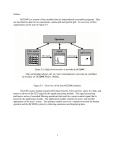
List-Mode is a special technique used in collision-physics. In this mode all acquired information (named coordinates in
CoboldPC) is stored event by event in a data-list (see Figure 1).
Version 6.2.90.2
Page 6 of 32