1
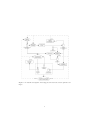
Step 1 Only the spi calculus model and the eSpi specification are given as input to the spi2Java refiner. The tool generates an eSpi document using all
the information that can be automatically inferred from the given model.
In particular, types are assigned to terms based on their use, while cryptographic and configuration parameters and the encoding layer are set to
their defaults.
1. The generated eSpi document is manually refined, adding the
needed information that could not be automatically inferred.
Step 2
2. The spi2Java refiner runs again, taking the manually modified eSpi
document, the spi calculus model and the eSpi specification as input.
The newly generated eSpi document contains all the information that
could be automatically inferred from the model and from the manually provided information.
It must be pointed out that refinement (step 2) can be repeated as many
times as needed, until a satisfactory eSpi document is generated by the spi2Java
refiner. However, in most cases, like in this example, one run of step 2 is enough.
3.3.2
Practice
Now we will show how the above presented steps can be accomplished in practice.
Step 1: Creating an eSpi Template.
The eSpi document for the client process can be created by using the SpiTyperTextual
program. To obtain information for the SpiTyperTextual program options, it
suffices to either call the program without parameters or by supplying the -h
option, e.g.
java -jar SpiTyperTextual.jar -h
So, to create a first eSpi document from the symbol table of the PA Andrew
process (i.e. step 1), the following command can be used:
java
-d
-e
-o
-s
-f
-jar SpiTyperTextual.jar
./data/
./data/espi_specification.xml
./testData/andrew/andrewPATemplate.xml
./testData/andrew/andrewPA.css
As a result, the eSpi document is created as ”./testData/andrew/andrewPATemplate.xml”
(since -o option specifies this as the output file), from the symbol table file (specified by the -s option). The -f option is supplied to instruct the program to
silently overwrite the output file if this already exists. The -d option specifies
the path to the SYSTEM DTD. This file is used by the tool to validate the eSpi
document (which is an XML file). Finally, the -e option specifies the filename
and path of the eSpi document.
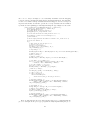
Here is the content of the generated andrewPATemplate file.
<?xml version="1.0" encoding="UTF-8" standalone="no"?>
<!DOCTYPE espi_types PUBLIC "espi_language.dtd" "./data/espi_language.dtd">
<espi_types>
<process id="0" name="pA_0">
12