1
System Setup
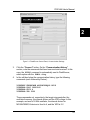
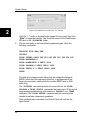
FlashRunner will respond to each command with the > string,
indicating that the command has been successfully executed. After
sending these commands, the Control Panel will look like the figure
below.
2
Figure 2.2: FlashRunner Control Panel, Target Device Configured
5.
When working with Freescale HC08 devices, FlashRunner requires you
to specify the power up and power down times, in milliseconds. Send
the following two commands:
TCSETPAR PWDOWN 10
TCSETPAR PWUP 10
6.
24
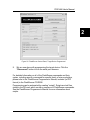
After specifying the target device settings, we are ready to transfer to
FlashRunner the binary image to be programmed into the target device.
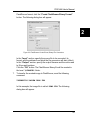
FlashRunner accepts only image files in a .frb (FlashRunner Binary)
format. To convert your binary, Intel-Hex or S19 image file to the