1
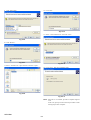
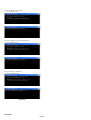
20. Click “Browse”.
22. After the installation completes, click “Finish”.
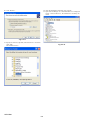
23. Open “Device Manager”. If “1384 Virtual Devices” is displayed
below “1394 Test Devices”, the installation is normally finished.
Fig. 6-3-17
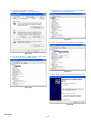
21. Specify the location (Uploader) where the driver is saved and
click “OK”.
The installation starts.
Fig. 6-3-19
Fig. 6-3-18
HVR-DR60
6-6