1
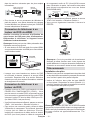
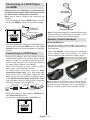
Connecting to a DVD Player
via HDMI
Please refer to your DVD player’s instruction book
for additional information. Power off both the TV and
the device before making any connections.
Scart Cable
(not supplied)
Note: Not all cables shown in the illustration are
supplied.
• If your DVD player has an HDMI socket, you can
connect via HDMI for better video and audio quality.
HDMI 1
HDMI Cable
(not supplied)
External device
• Note: These three methods of connection perform the
same function but in different levels of quality. It is not
necessary to connect by all three methods.
SPDIF
Coax.OUT
Remote Control Handset
External device
• When you connect to DVD player as illustrated above,
switch to the connected HDMI source. See, Input
Selection section for more information on changing
sources.
Connecting to a DVD Player
• Some DVD players are connected through
COMPONENT SOCKETS (YPbPr). YPbPr can be
used only when you connect a device that has a
YPbPr output through the PC input with YPbPr to
PC cable (YPbPr cable is not supplied).
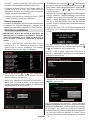
Inserting Batteries
• Remove the battery cover located on the back of
the handset by gently pulling backwards from the
indicated part.
• Insert two AAA/R3 or equivalent type batteries
inside. Observe the correct polarity (+/-) when
inserting batteries and replace the battery cover.
• When the connection is made, switch to YPbPr
source. See, “Input selection” section.
• To enable audio connection, use the VGA/
Component Audio cable. First, plug single jack
of the cable to the TV. Afterwards, insert your DVD
player’s audio cable’s connectors into the plural part
of the VGA/Component audio connection cable
(see illustration below). Colours of the connected
jacks should match ( RED & WHITE).
Audio Cable
(not supplied)
SIDE AV
AV Connection
Cable (supplied)
Note: Remove the battery from remote control
handset when it is not to be used for a long period.
Otherwise it can be damaged due to any leakage of
batteries. Remote range is approximately 7m/23ft.
To DVD Player's
Audio Outputs.
• When the connection is made, switch to YPbPr source.
See, Input selection section.
HDMI 1
• You may also connect through the SCART input.
SPDIF
Coax.OUT
English - 51 -