1
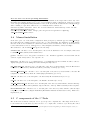
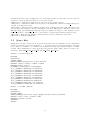
Give PDF viewer command for help files [acroread] :
• The paths to external data and tools (Hi and CO templates, Global Sky Model, WCSTools, EoR
templates,... see 2.6). If any of these are not installed, simply hitting the RETURN key will leave the default values indicated (and of course the corresponding functionality of the S 3 -Tools will not be available):
Give full path to directory under which to find the Hi and CO templates for SAX made by
Danail Obreschkow [/Path/To/Oxford Templates/] :
Give full path to directory under which to find the Hi templates for SAX made by
Rense Boomsma [/Path/To/Kapteyn Templates/] :
Give full path to directory under which to find the WCS binaries [/Path/To/WCS/bin/] :
Give full path to directory under which to find Global Sky Model [/Path/To/GSM/] :
Give full path to directory under which to find the IQU continuum templates for SAX made
by Tigran Arshakian [/Path/To/MPIFR Templates/] :
Give full path to directory under which to find the EoR signal templates made by Mario
Santos [/Path/To/IST Templates/] :
These are used to automatically edit the configuration file Config/Config Path.py, the original file being
moved to Config Path.py.bak. This configuration can be done manually, as explained in 2.4.
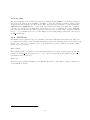
The installation script then proceeds with making the already mentioned symbolic links in Jobs/, and
finally reminds the user of a final mandatory step, which is explained in 2.5 :
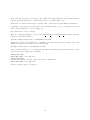
For the S3Tools to work, you need to compile the file S3.c under Routines/ into a
libS3.so shared object library. Please refer to the README file.
2.3.2
Upgrade
As already mentioned, the install.py script can also upgrade an existing installation. Although users
may want to do a backup of the Routines/ subdirectory, it is not necessary, as the script will always
make copies of the existing python files and shell scripts with a .bak extension4 . In any case, it is not
advised to do a full backup of the entire installation, especially if the Output/ subdirectory is swollen.
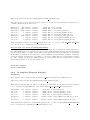
When upgrading, the script looks through the .py and .sh files inside the Routines/ subdirectory of the
distribution source, and seeks a file of the same name in the existing installation :
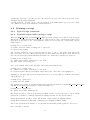
Upgrading S3Tools in /Users/levrier/Desktop/S3try/
If no such file can be found, the file is copied to the target directory, for instance
Adding ipol.py to your distribution...
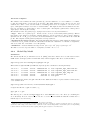
If a corresponding file is found, a diff command is performed on these. If a difference is found, the
existing file is backed up with a .bak extension and the new one is installed in its place, e.g.
ipol.py needs upgrading...
For the sake of users of earlier versions of the S 3 -Tools, the script also looks to see if you already have the
C/, Tests/ and Jobs/ subdirectories, which are new additions as of March 2011. If not, it creates them
and fills them with the relevant files, i.e. C-related files into C/ and symbolic links to the python files in
Routines/ into Jobs/. The Tests/ subdirectory is created empty, as in the case of a full installation.
4 Be
warned, however, that any existing .py.bak file, e.g. from a previous upgrade, will be lost in the process !
6