1
3.4 Inserting the Shelf Manager board
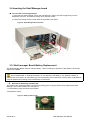
To insert the shelf manager board:
1. Insert the first Shelf manager card on the right-side slot, making sure that it plugs firmly into the
backplane connector, and that the locking clip is properly closed.
2. Fasten the locking screws on both sides of the board’s front panel.
Figure 6: Shelf Manager Board Insertion
3.5. Shelf manager Board Battery Replacement
The Shelf Manager Board contains a lithium battery. There is a danger of explosion if the battery is incorrectly
replaced or handled.
Do not disassemble or recharge the battery. Do not dispose of the battery in fire. When the battery is
replaced, the same type or an equivalent type recommended by the manufacturer must be used. Used batteries
must be disposed of according to the manufacturer’s instructions.
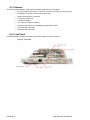
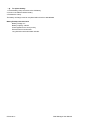
Removal of the battery isolation film:
The isolation film protects the battery and saves its energy prior to using it. Before using a brand new Shelf
Manager, remove the isolation film. See figure 7.
1. Lift the battery clamp and remove the isolator.
2. Release the clamp.
Figure 7: Battery Isolation Film
CC08105-01
Shelf Manager User Manual