1
Chapter 4: Using Internet
Mobile Network
Check availability of these connections with network service provider and obtain the
following information:
•
•
•
•
•
Access Point Names
Proxy
Port
User name
Password
To set up wireless data connection
1.
2.
3.
4.
5.
6.
7.
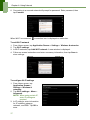
Tap Application Drawer > Settings > Wireless & networks.
Tap Mobile networks > Access Point Names.
Tap Menu > New APN.
Tap Name to enter a name for the connection, then tap OK.
Enter APN, then tap OK.
Enter Proxy, Port, Username, and Password (if available) etc., then tap OK.
Tap Save to store settings or tap Discard to exit without saving any change.
18