1
LAARS Sequencing Controls S8 & S8EXT
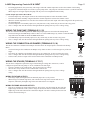
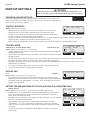
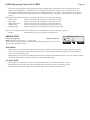
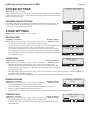
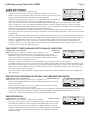
LEAD BOILER
Depending on the number of stages
Default: The first set of stages
Button: MENU/<System Settings>/<Stage Settings>/<Lead Setting>/Rotate Mode
• The Lead Unit’s lowest stage will always be the first stage brought on when there is a
call for output. As more output is needed, additional Stages are added.
• The Lead Unit is always shown on the main display in brackets.
• In a 2-Stage system (see Boiler Type in the Startup section), the display will show the
two Lead Unit stages bracketed <AB>. In a 3-Stage system, the display will show the
three Lead Unit stages bracketed <ABC>, and so on.
• If Pump or Valve is selected as the Boiler Output in the Startup menu, the Valve or Pump
letter will be skipped from the number of stages. See example to the right. The missing
stage C and F represent the Unit Valve or Pump.
• The Lead Unit can be rotated based on the Rotation Mode selected. (See next setting)
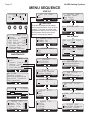
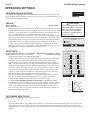
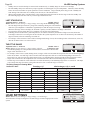
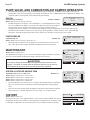
ROTATE MODE
Adjustable Time (1 hr to 999 hrs), Manual, FOFO
Default: Time (24Hours)
Button: MENU/<System Settings>/<Stage Settings>/<Lead Setting>/Rotate Mode
• The Lead Unit is the first unit brought on when output is required.
• The Lead Unit can be rotated automatically, manually or based on First-On/First-Off
(FOFO). The automatic rotation is recommended for most applications.
• The current Lead Unit is shown in brackets on the main display.
• Only units which are set to Auto Mode can be Lead. Therefore, not all the units may be
available when manually selecting a new Lead Unit.
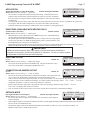
• If Time is selected, a second screen will allow the adjustment of the Auto Rotate Period
If 24 Hours (default setting) was selected, the first rotation will take effect after 12 hours
if the Time was not set. However, if the Time was set, the rotation will always take
place at 2:00AM. The following rotations will take place every 24 hours thereafter.
• If First-On/First-Off (FOFO) is selected, the concept will follow this example; If A is the
Lead, the starting sequence will be A, B, then C. When the de-energizing of the stages
starts it will turn off A, B, Then C. Then stage D will be the new lead for the next load.
SETBACK SCHEDULE
Page 25
--
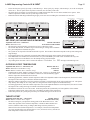
No Pump or Valve stages
LEAD BOILER --
BACK
SELECT
with Pump or Valve stages
-- LEAD BOILER -AB
DE
BACK
SELECT
-- LEAD ROTATION -Time
Manual
FOFO
SELECT
BACK
If Time Rotation is selected
AUTO ROTATE PERIOD
24hrs
[
]
SAVE
BACK
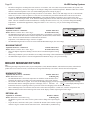
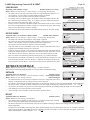
SETBACK SCHEDULE
Setback
0 F
Present Time **:**
Day Schdule 7:00Am
Night Schdul 7:00Pm
SELECT
BACK
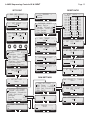
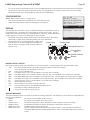
Button: MENU/<System Settings>/<Stage Settings>/<Setback Schedule>
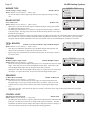
This menu provide the Day/Night Schedule as well as the Setback and Boost settings.
SETBACK
------ SETBACK ------Adjustable 0°F/0°C to 80°F/44°C
Default: 0°F/0°C
0 F
Button: MENU/<System Settings>/<Setback Schedule>/Setback in Day/Night Schedule
[
]
Button: MENU/<System Settings>/Setback
in External Signal
BACK
SAVE
• The Setback feature can be used to provide the S8 with a lower temperature Set Point in
Heating or a higher Set Point in Cooling when less load is required.
• For example, if in heating the calculated temperature is 180°F and the Setback is 20°F, then when in Setback, the S8 will hold a
Set Point of 160°F. The new Set Point will appear on the main display indicating this condition "Setback to 160 F".
• A typical use for Setback is to provide less system temperature in heating to a building during the night or on the weekends
when building is not occupied, but heat is still required.
• After selecting a value in Setback, you'll be directed to the Boost menu.
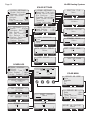
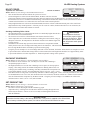
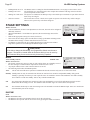
BOOST
-------- BOOST --------Adjustable 0°F/0°C to 80°F/44°C
Default: 0°F/0°C
0 F
Button: MENU/<System Settings>/Setback/Boost
[
]
• This features allows a building to either warm up or cool down quickly after a Setback
SAVE
BACK
period to bring the building to the desired temperature faster.
• The Boost temperature will be the number of degrees to be added in Heating or subtracted in Cooling from the Calculated
Target Temperature.
• Using the previous example, if the Target was 180°F and the Setback was 20°F and the Boost was 10°F for 30 minutes, after the
setback period, the Boost will change the target to 190°F for a period of 30 minutes. The new Set Point will appear on the main
display indicating this condition "Boost to 190 F".