1
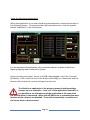
What we need to do is measure the how the focus position changes over time as the temperature varies. Let’s assume that its early evening and the temperature outside is 10C. The forecast says that tonight the temperature will fall sharply after dark to a low of ‐8C. This is a perfect time to measure your slope parameter. Begin with the telescope cooled to the current ambient temperature and well focused. Press the ‘Sample’ button. The current position and the current temperature are copied to the first available slot in the mapping area (10 in the screenshot). Now wait until the temperature falls by an appreciable amount. Say 1 degree. Refocus your telescope precisely again and press the sample button again. Another slot in the mapping area is filled. Continue to repeat this exercise until you have a significant amount of data collected. 5 samples over 5 degrees C would be the minimum recommended amount of data for a good slope calculation. If you have devoted the evening to this purpose then continue to measure until the temperature reaches the overnight low or at least until it stops falling dramatically. You will also note the Sample every X minutes option. If you fill in a value here, a sample will be taken automatically at the specified period. Let’s give an example of how you might use this feature in practice. In this example you set the timer to sample every 15 minutes. You start on the hour so a sample is taken every 15 minutes thereafter. If you have software for autofocus, you set this to autofocus 5 minutes earlier than the sample is due to be taken. i.e. 10 past, 25 past, 20mins to and 5 minutes to the hour. This way the data is collected automatically and unattended. When you have collected enough data, press the ‘Calc Slope’ button (Area 8). A ‘least squares’ fit is calculated from your data and the Slope box is populated with the result. Although this value is saved it is a good idea to note this value elsewhere in case you every need to enter it again. Once you have a good slope value which works for you. It will always work. You bypass the measurement process and just enter the slope directly and press the ‘Set’ button (in area 8) Page 12