1
10. Special functions
The heating control has several special functions.
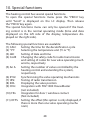
To open the special functions menu press the “PROG” key
until “Sond” is displayed on the LC display. Then release
the “PROG” key again.
The special functions menu can only be opened if the heating control is in the normal operating mode (time and date
displayed on the left side of the display, temperature displayed on the right side).
The following special functions are available:
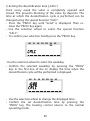
(1) CALC Setting the time for the decalcification cycle
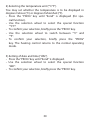
(2) °C°F Selecting the temperature unit (°C or °F)
(3) dAt Setting of date and time
(4) CodE Changing the safety code for radio transmission
and setting of codes for new valve operating mech
anisms, respectively
(5) An A Setting the number of valves controlled by the
heating control and extending the system,
respectively
(6) SYnC Synchronising the valve operating mechanisms
(7) tESt Testing of radio transmission
(8) StEL Displaying the valve position
(9) CEnt Integration with FHZ 1000 HouseMaster
(not included)
(10) FEn
Integration for door / windows contact
(Not included)
(11) OFFS Setting the offset (this option is only displayed, if
there is more than one valve operating mecha
nism)
28